MAGICUI · UNREAL ENGINE
Build UI with HTML, CSS, and JavaScript
Render HTML project inside Unreal, present it through UMG, forward mouse and keyboard input, and exchange structured events with Blueprints.
What you can build
Web-powered screens
Use modern HTML, CSS, and JavaScript for menus, HUDs, inventories, terminals, and other interactive interfaces.
Native UMG presentation
Display the browser texture with the Magic UI widget inside a normal Canvas Panel, including sizing, focus, pointer input, and transparent pass-through.
Two-way events
Send JSON values in both directions with the raw page bridge, named MagicUI events, or typed Unreal Gameplay Tag events.
Tunable presentation
Choose Auto, CPU, or GPU (Accelerated), set a 1–240 FPS output ceiling, follow the current monitor refresh rate, and inspect completed UI FPS.
The shortest path to a working screen
- Copy the packaged plugin folder into
<YourProject>/Plugins/MagicUI/. - Enable MagicUI and restart Unreal Editor.
- Create an
index.htmlfile and import it into the Content Browser. - Assign that imported MagicUI Web File to a Magic UI Component.
- Put a Magic UI widget inside a full-screen Canvas Panel.
- Connect the widget to the component, create the screen widget, and add it to the viewport.
The Getting started tutorial walks through every click, expected result, and Blueprint connection.
Local content only
This plugin build does not open public web addresses. It accepts imported
web assets and immutable local magic://bundle/ content. Remote http,
https, file, data, and arbitrary URL schemes are rejected.
Choose a guide
| I want to… | Start here |
|---|---|
| See HTML on screen for the first time | Getting started |
| Understand imported HTML and packaged resources | Web assets and local content |
| Connect JavaScript and Blueprints | JavaScript bridge |
| Use friendly named events | MagicUI Event component |
| Use typed event names from Unreal | Gameplay Tag events |
| Make a menu open and close correctly | Show and hide a menu |
| Tune sharpness, DPI, FPS, or rendering | Sizing and DPI and performance |
| Prepare a Shipping build | Cooking and packaging |
| Diagnose a blank or non-interactive UI | Troubleshooting |
How MagicUI is divided
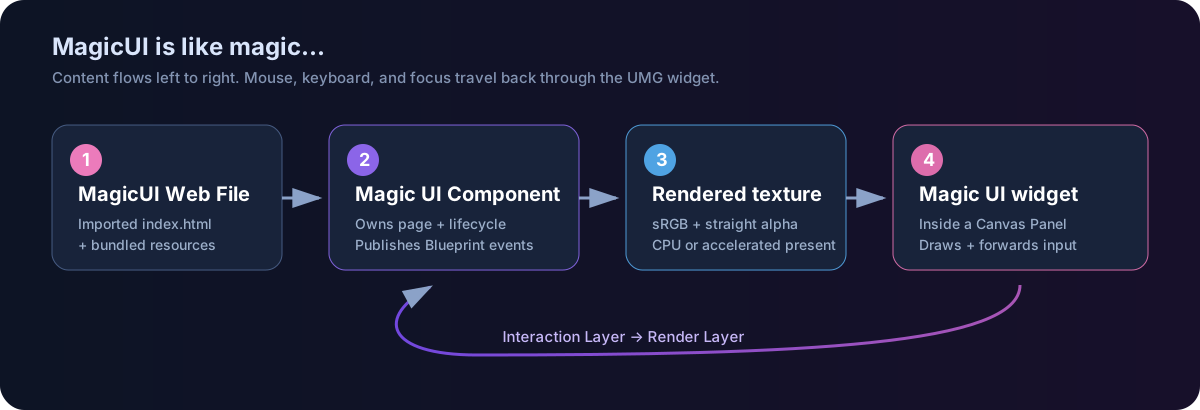
- The Magic UI Component owns the web view, loads content, exposes the texture, and publishes Blueprint events.
- The Magic UI UMG widget draws that texture and forwards UMG/Slate input.
- A MagicUI Web File is Unreal's imported, cookable link to the HTML entry file and its supported sibling resources.
- The optional MagicUI Event components add named JSON or Gameplay Tag messaging on top of the raw bridge.
These pieces are deliberately separate. Once that mental model clicks, the rest of the plugin becomes pleasantly straightforward.